Why Roblox Codes Matter to Every Player
Roblox experiences frequently reward active players with free in-game currencies, temporary experience multipliers, stat reset tokens, exclusive cosmetics, and rare companion pets. Developers distribute these benefits through promotional redeem codes to celebrate community milestones (such as hitting 500k likes), promote new seasonal content updates, or compensate players following unscheduled server maintenance.
Because most codes have strict expiration windows or limited redemption counts, knowing exactly how and where to enter them the moment they are announced gives you a massive competitive advantage. Whether you are grinding levels in an anime action RPG or building an empire in a tycoon simulator, timely redemption can shave dozens of hours off your progression.
The Four Universal In-Game Redemption Patterns
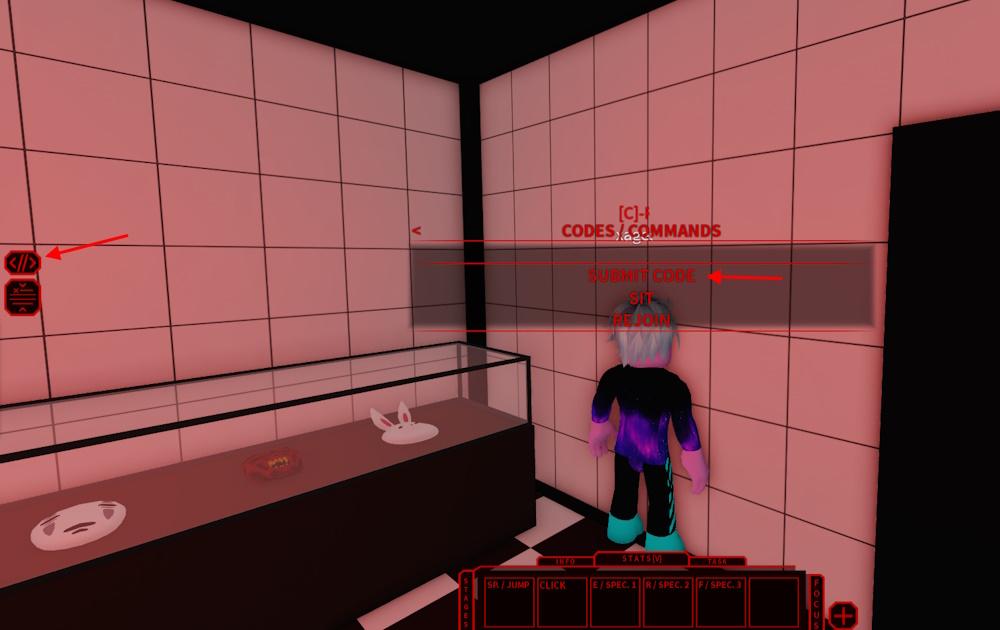
Unlike traditional games with a single standardized launcher menu, individual Roblox experiences are built independently by different studios. Consequently, code redemption mechanics vary by title. Across thousands of Roblox experiences, redemption flows fall into four primary UI patterns:
1. The In-Game Twitter / Bird Icon Method
This is the most widespread pattern in popular action and adventure games such as Blox Fruits, King Legacy, and Blade Ball.
- Look for a small bird icon or a button styled like the classic Twitter logo on the left or right HUD overlay.
- Clicking the icon opens a compact modal window with a text field labeled "Enter Code Here" or "Promo Code".
- Enter the code exactly as written, then click Redeem, Submit, or the green checkmark icon.
- A success popup or HUD toast notification will display the items added to your account inventory.
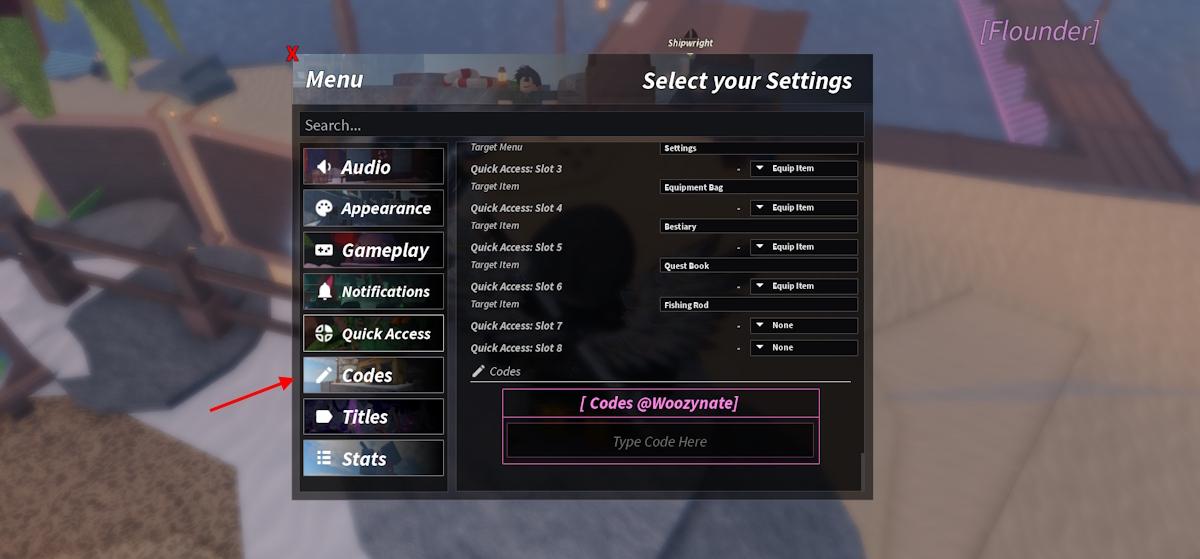
2. Settings Menu and Promo Sub-Tabs
Tycoons, simulators, and strategy games (such as Bee Swarm Simulator, Muscle Legends, and Tower Defense Simulator) commonly tuck code redemption inside the primary configuration interface.
- Click the Gear / Settings icon on the main HUD (often top-left or bottom-left of the screen).
- Scroll to the bottom of the settings list or look for a tab titled Codes, Promo, or Gifts.
- Type or paste your code into the prompt box and hit the Submit or Enter button.
- Check your currency counters at the top of the screen to confirm the balance has increased.
3. Dedicated In-Game NPCs, Mailboxes, and Code Zones
Immersive roleplay and hub-based anime titles (such as Anime Vanguards, Anime Defenders, and All Star Tower Defense) integrate redemption directly into the 3D game world.
- Spawn into the main lobby or spawn island.
- Locate a specialized NPC (often named Codes Master, Loot NPC, or Rewards Giver) or an interactive Mailbox prop near the spawn fountain.
- Walk your character into the glowing interaction circle or press the [E] key when the prompt appears.
- Paste your code into the dialogue window and confirm your claim.
4. Official Roblox Web Redemption (Account-Wide Catalog Items)
A small subset of codes applies to your global Roblox avatar rather than a specific experience (e.g., promotional hats, shoulder pets, or virtual concert gear).
- Open an external web browser and navigate to
https://www.roblox.com/redeem. - Sign into your primary Roblox account.
- Type the 10-to-12 digit promotional code into the redemption box and click Redeem.
- The virtual item will be placed directly into your global Avatar Inventory.
Step-by-Step Walkthrough: Claiming In-Game Codes Correctly
To minimize failed attempts, follow this optimized five-step verification routine:
- Verify the Source: Ensure you copied the code from a verified tracker, official developer Discord, or verified social handle.
- Launch into a Stable Server: Avoid claiming codes during high-latency server transitions or boss fights to prevent transaction dropouts.
- Copy and Paste Cleanly: Use keyboard shortcuts (
Ctrl+Von PC, long-press Paste on mobile) to eliminate transcription typos. Verify there are no accidental leading or trailing spaces. - Observe Case-Sensitivity: Almost 95% of Roblox redemption systems use case-sensitive string matching.
RELEASE100KandRelease100kare treated as completely distinct entries. - Inspect Inventory and Notifications: After clicking Redeem, watch the center of your screen or open your in-game bag to verify the items or boosts have registered.
Troubleshooting Common Redemption Errors
| Error Message Displayed | Root Cause | Immediate Action Required |
|---|---|---|
| "Invalid Code" | Typo in spelling, wrong letter casing, or hidden whitespace. | Re-copy the exact string; check for trailing spaces before clicking Submit. |
| "Code Already Redeemed" | The code has already been credited to your Roblox account. | Codes are single-use per account. Check your inventory history or character stats. |
| "Code Expired" | The developer has deactivated the promotional campaign. | The code is no longer usable. Browse our live directory for newer active drops. |
| "Level Requirement Not Met" | The experience enforces a minimum player level (e.g. Level 15+). | Complete early tutorial quests to level up before attempting redemption again. |
| "Server Sync Error" / No Response | High server traffic or local connection lag. | Rejoin a different public or private server and retry once the UI finishes loading. |
Pro Tips to Never Miss Limited-Time Drops
- Bookmark Verified Game Directory Pages: Save the dedicated LootBeam codes page for your favorite titles and refresh before beginning daily grind sessions.
- Enable Discord Announcement Alerts: In developer Discord servers, navigate to the
#announcementsor#codeschannel, click the bell icon, and select All Messages. - Beware of Scam Prompts: Never enter your Roblox password, account PIN, or personal email address inside any in-game "code box" or external third-party form. Real codes will never ask for your account credentials.
Frequently Asked Questions
Can I redeem the same code more than once?
In almost all Roblox experiences, promo codes are strictly limited to one redemption per account. However, on rare occasions developers reset code redemption databases after major balance reworks, allowing players to reclaim previously expired rewards.
Do Roblox codes work on mobile and console?
Yes. As long as the Roblox game supports mobile (iOS/Android) or console (PlayStation/Xbox) platforms and displays the redemption UI, active codes function identically across all devices.
How often are new codes released?
Most active development teams release new codes on a bi-weekly or monthly cadence, coinciding with major version patches, holiday events, or milestone celebrations (e.g., follower counts and game visits).